The Kalart Rangefinder
SYNCHRONISING THE RANGE FINDER
WITH THE LENS.
First of all: Infinity adjustment.
There are different types of Range Finder installations and in the event your Range Finder is out of adjustment at infinity
reset it in
accordance with the applicable illustration following.
The following 4 steps are to be followed in readjusting the Range Finder for the same lens or another lens:
1) Check infinity focus of lens – if necessary relocate camera infinity stops.
2) Set Range Finder for infinity.
3) Adjust Range Finder for 15-25 ft. distances.
4) Adjust Range finder for 4-8 ft. distance.
SETTING THE RANGE FINDER FOR INFINITY
The first step in synchronising the Finder to a lens is to establish the correct infinity position for the lens
if necessary relocate the camera infinity stops
Focus on a tall building, chimney, flagpole etc. on at least ½ mile distant.
Anniversary Models
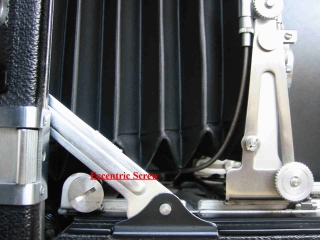
On all Anniversary Models of the Speed Graphic Camera, The infinity adjustment is made by turning the eccentric screw (see fig A)
attached to the
rear of the right runner of the camera track.
Move this screw very slightly back to raise the movable image and forward to lower the movable image.
You may prefer to use a dime to turn the screw.
Graflex Miniature Camera
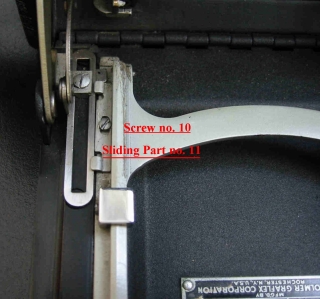
On Miniature Model Speed Graphic Camera, the infinity adjustment is made by Loosening screw no. 10 (see Fig. B) and
moving the sliding part no. 11 back to raise the movable image and forward to lower it.
Make sure to tighten screw no. 10 after setting this adjustment.